Conversation Diagnostics Agent
The Conversation Diagnostics Agent analyzes past conversation logs in real time to help you troubleshoot execution failures, debug root causes, and coordinate direct fixes without manual log scanning.
Info: This AI Authoring Agent is available starting with Druid 9.30.
Key Capabilities
- Automated log analysis. Evaluates execution paths within Conversation Transcript, Conversation Trace, and Flow Trace views to pinpoint runtime exceptions, execution delays, logic gaps, and dialog bottlenecks.
- Root cause diagnosis. Provides structured technical breakdowns of errors—such as missing authorization headers, unconfigured task parameters, or failed integration calls—complete with specific task configurations and endpoint details.
- Actionable Fix Recommendations. Recommends precise corrective steps or applies automatic updates directly to existing steps and task configurations to accelerate AI Agent authoring.
- Automated Integration Fixes. Coordinates and applies direct fixes for supported integration types: Data Service, REST API, SQL, Druid API, and Custom Code.
- Cross-Specialist Remediation. Coordinates multi-part fixes by routing integration issues to the Integration Agent, behavior updates to the Review & Update Agent, and validation to the QA Testing Agent.
- Sequential Fix Ordering. Sequences remediations chronologically: applying connection fixes first, followed by behavior updates, followed by automated re-testing.
Operational Rules
- Automatically applies connection updates only for supported integration types (Data Service, REST API, SQL, Druid API, and Custom Code).
- Provides manual step-by-step guidance and troubleshooting instructions when encountering errors in unsupported integration formats.
- Prompts for explicit user confirmation before applying fixes or running automated tests; auto-remediations are never applied silently.
- Hands off non-diagnostic tasks—such as building new agents from scratch or creating visual charts—to the appropriate AI Authoring Agent automatically.
Access troubleshooting assistance
To get troubleshooting and debugging assistance, navigate to either Conversation Transcript, Conversation Trace, or Flow Trace and click the Page Help icon at the top.
Review the generated diagnosis, problem root cause, and suggested remediation steps provided by the agent.
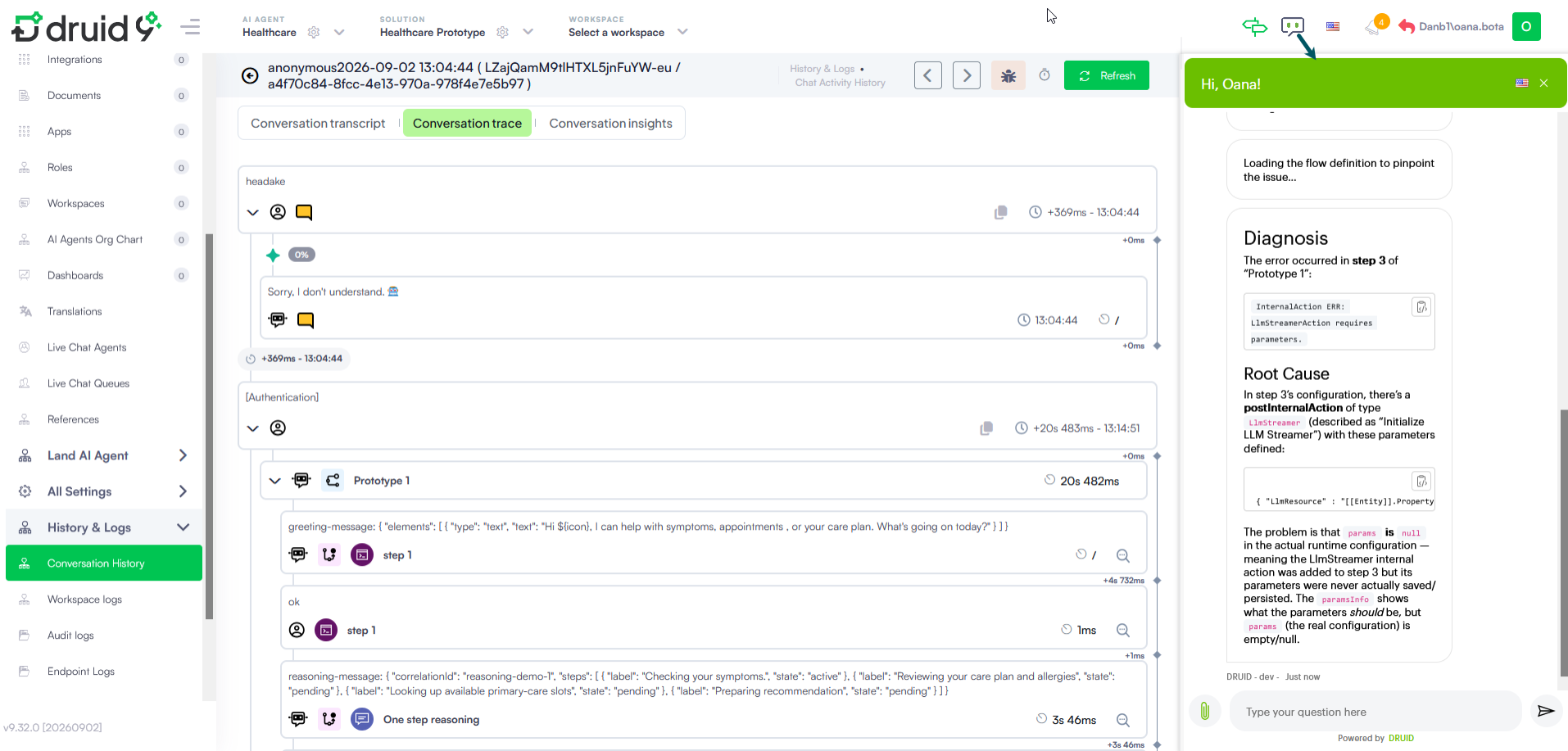
The agent can apply direct fixes if requested only for the following integration types: Data Service, REST API, SQL, Druid API, and Custom Code.